Owning cars guide · 1 of 3
GTA 6 car trackers: how they work and how to deal with them
Why some cars bring the police, how to check before you steal, and what to do with a tracked car.
What to do
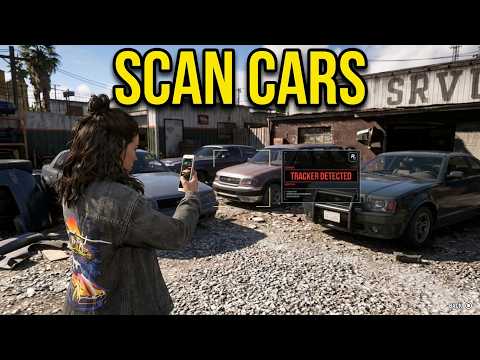
Step 1. Scan a parked car with your phone before you take it, to see if it has a tracker, an alarm or other extras.
Step 2. Read the tracker type on the scan. Low-end cars usually have none, mid-tier cars a standard tracker, and high-end supercars an advanced one.
Step 3. Know what a standard tracker does: it alerts the police to the spot where you steal the car.
Step 4. Know what an advanced tracker does: it calls the police to you when you drive too slowly, so keep tapping the gas.
Step 5. Skip cars that need the Key Cloner unless you are ready, because they often carry advanced trackers.
Step 6. Take a standard-tracker car to a Pay 'n' Spray to register it. Cars with the red advanced tracker are refused there.
Step 7. Take an advanced-tracker luxury car to Randy from Chapter 3 onward. He removes the tracker so you can register or sell it.
Step 8. Keep a high-end car you cannot clean yet in a purchased garage until the tracker can be removed.
Step 9. If a scanned car has a tracker you cannot deal with yet, take another car instead, since a tracker keeps police on you.
Good to know
- A standard tracker blocks modding at a mod shop until you register the car as yours.
- Mod shops accept only cars with no tracker at all.
- Police no longer show on the mini-map, so you must spot them yourself when a tracker draws them in.